See what you worked on and what got done.
Time Momentum keeps your Claude Code session history per project, together with Codex and Cursor. Every session carries a title that says what it was about, next to your commits and working time.
- 30 days of Pro
- No credit card
- Then continue on Free
- Webhook for incoming paymentsClaude Coderunning · 34 min+212−18
- Login with passkeysCodex · 2 subagents1:06 h5 commits+1,084−312
- Checkout moved to new pricing logicClaude Code52 min3 commits+418−96
- Cart: quantities and variantsClaude Code41 min2 commits+265−40
- Data model for products and stockCursor1:20 h4 commits+702−131
+2,681 −597 lines
Your activity log, per project
A title for every session
The tool's own title where there is one. Otherwise a short title made from the first prompt; the prompt itself is not stored.
Sessions, timers and commits
One timeline per project, grouped by day.
Commits with their size
From GitHub with files and lines changed, and commits made in Claude Code.
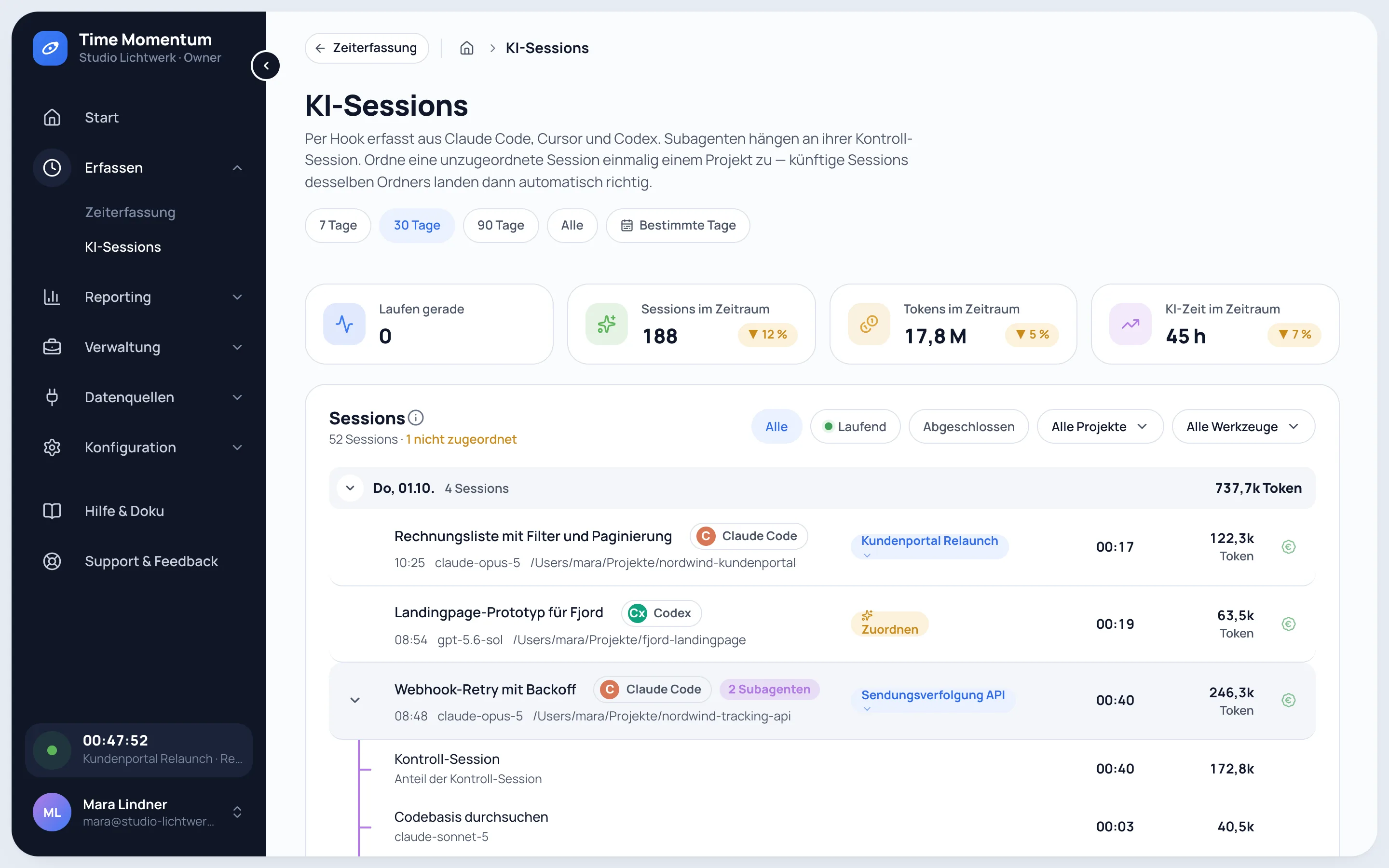
Subagents under their session
What a session handed off stays with it.
Sorted by project
Sessions are assigned by folder, repository or keywords in the title.
Your past weeks included
At setup, earlier Claude Code and Codex sessions are imported from the local transcripts.
For you first, then for your client
The history answers the questions you ask yourself: what did I do on this project last week, which session was it, what came out of it. Answers and code stay on your computer. A prompt only goes out when the tool has no title of its own: the first one, shortened, to make a title from it.
When your client wants to know, the same work becomes a progress report with sessions, runtime and commits.
Every week in a few points
With project progress switched on, a language model sums up each week's commits, session titles and time entry descriptions of a project in a few points, each with its effort. You edit points, hide them or add your own, such as a sign-off.
The weekly points of a period become a report with a summary and effort. Copy it or add it to a client report. Free includes one trial report, Pro as many as you need.
All sessions in one list
Ask your agent about your history
- Which sessions have no project yet?
tm ai-sessions list --status unassigned - Assign this one to the client project
tm ai-sessions assign <session-id> --project-id <project-id> - What happened on the project in September?
tm progress list <project-id> --from 2026-09-01 --to 2026-09-30 - Sum it up for the client meeting
tm progress report <project-id> --from 2026-09-01 --to 2026-09-30
Agent access is part of Pro.
Next steps
Effort
Working time, agent runtime and tokens of the same sessions.
Measure effortClient reports
Turn the work of a period into a progress report for your client.
Client reportsIntegrations
How sessions from Claude Code, Codex and Cursor get in.
Integrations
See your past weeks
- 30 days of Pro
- No credit card
- Then continue on Free
Frequently asked questions
Where does a session title come from?
From the tool where it has one: Claude Code's own or renamed title, the Codex thread name, the Cursor chat name. Otherwise the first prompt, shortened to 200 characters, is turned into a short title of a few words by a language model, if AI short titles are switched on. Only that title is stored.
Which AI writes the weekly points?
Claude Haiku by Anthropic, and only when the owner switches on project progress for the workspace; it starts switched off. The model gets commit messages with line counts, session titles and time entry descriptions, no code.
What leaves my computer?
Metadata such as model, tokens, runtime, folder and title, plus the shortened first prompt when the tool has no title of its own. Answers and code never leave it. Session content can be switched off entirely or excluded for certain folders.
Which tools are supported?
Claude Code, Codex and Cursor. Sessions are captured automatically by the tm command line, including the subagents of Claude Code and Codex.
Can I see sessions from before I signed up?
For Claude Code and Codex, yes. At setup, the collector imports earlier sessions from the transcripts these tools keep locally, as far back as they reach. Cursor keeps no transcripts.
How far back does the history go in Free?
Free shows AI sessions of the last 30 days. Pro shows the full history; older sessions are hidden in Free, not deleted.